Case study · PTC
Industrial IoT
Designing the operating system for the factory floor
Year · 2019–2022
Role · Lead Product Designer (Player-Coach)
Product · Digital Performance Management (DPM)
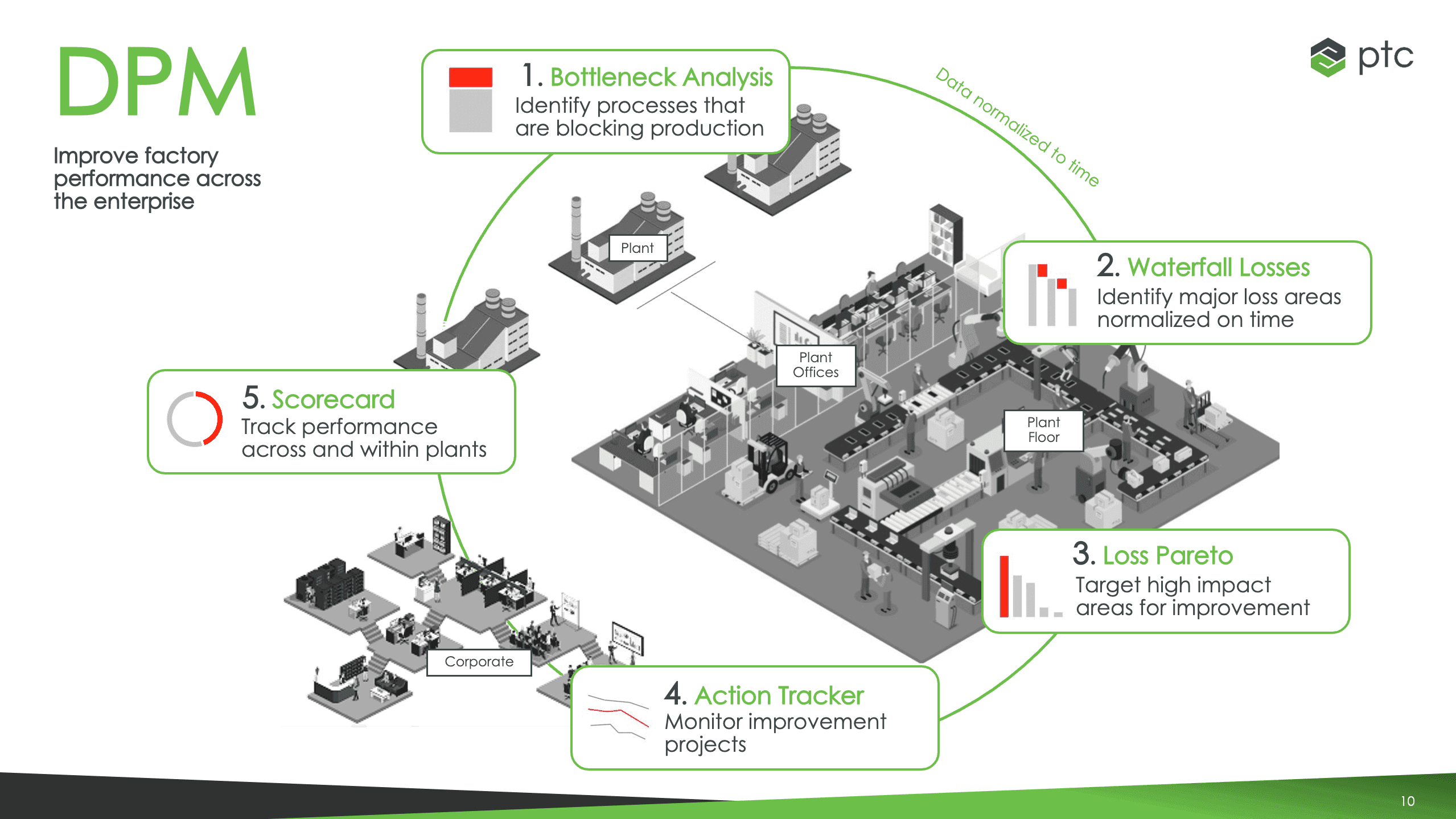
The factory floor generates more data than any team can act on. We changed that.
Manufacturing plants lose millions of dollars a year to unplanned downtime, inefficient scheduling, and root causes nobody can find fast enough. The data exists — inside machines, PLCs, and ERP systems — but turning that signal into something a plant manager can act on in real time is one of the hardest UX problems in enterprise software.
Digital Performance Management (DPM) was PTC's answer to that problem. Built on the ThingWorx IoT platform, it connected real factory operations data to an analytics and configuration layer that gave every level of a manufacturing organization — from the floor operator to the plant director — visibility into what was happening, why, and what to do next.
I led product design as a player-coach on the Digital Transformation Solutions team, owning the 0→1 design effort alongside three core designers, a dotted-line partnership with R&D designers during productization, and a close collaboration with the Thingworx design system team. This was among the most complex problems I've worked on — and I'm immensely proud of what the team built.
Context
- Role
- Lead Product Designer (Player-Coach)
- Team
- 3 core designers + R&D dotted-line designers during productization
- Platform
- PTC ThingWorx IoT Platform
- Design system
- ThingWorx Design System (close partnership)
- Approach
- Player-coach model — I was in the work alongside the team, not directing from a distance. I facilitated research, ran design sprints, designed alongside the team, and managed stakeholder alignment simultaneously.
Every factory is different. Every factory has the same problem.
OEE — Overall Equipment Effectiveness — is the gold standard metric for manufacturing performance. It measures availability, performance, and quality, and most factories have no reliable way to track it in real time across sites, lines, and work centers.
When something goes wrong on a line, the question isn't just "what broke" — it's "where in this entire operation is the biggest bottleneck right now, and what's causing it?" Without the right data model and the right interface, that question takes hours or days to answer. Every hour of unplanned downtime has a dollar figure attached to it.
The design challenge was compounded by the sheer variability of the environment. No two factories are configured the same way. Products, materials, work centers, reason trees, scheduling rules — everything is different. We had to design a system flexible enough to configure for any operation while still being understandable by the people who needed to use it daily.
You can't design a factory from a conference room.
Our process was grounded in the belief that research and validation aren't phases — they're continuous. We embedded ourselves in the problem before we touched a design tool.
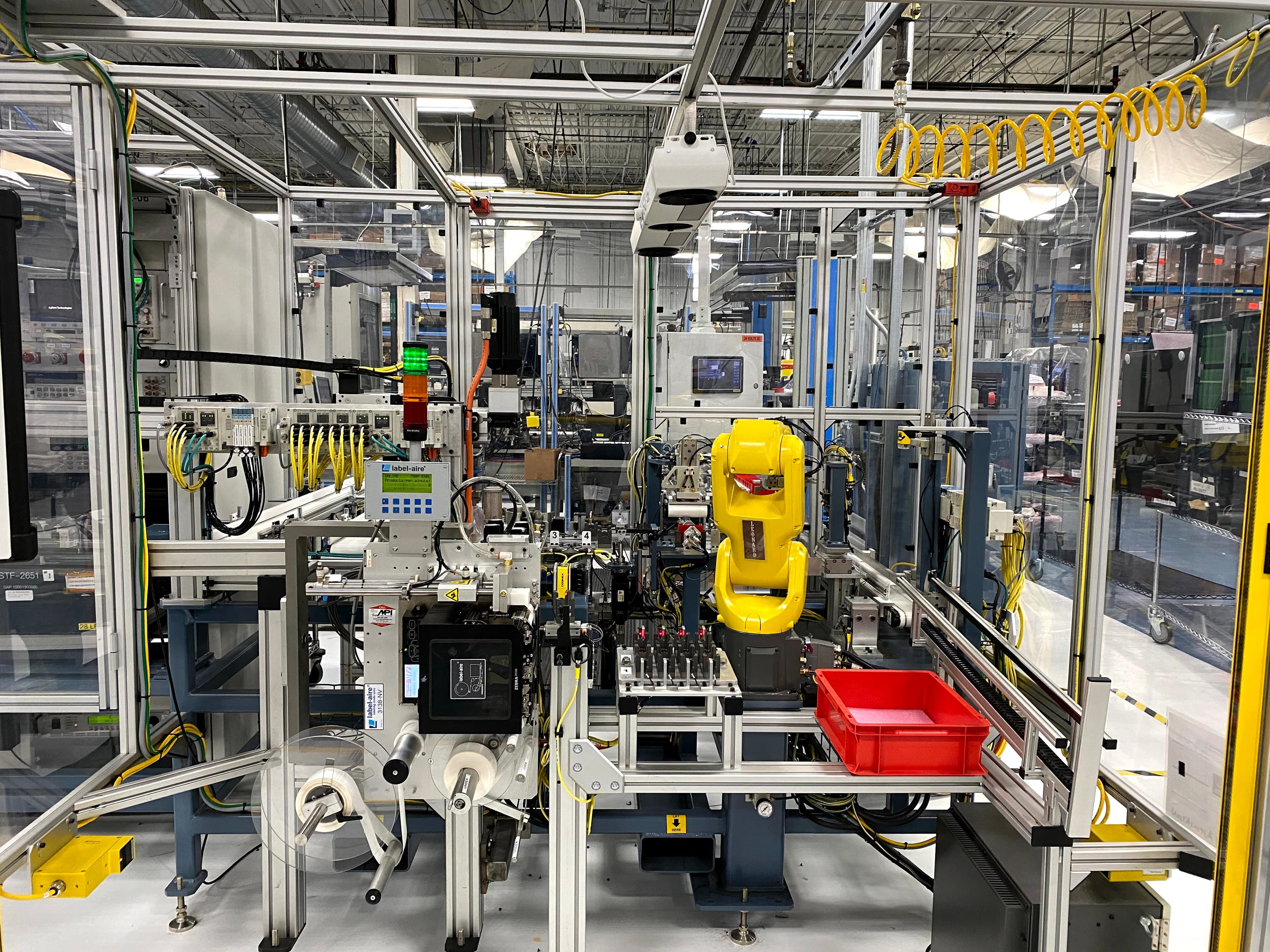
Site visits
We traveled to factories across the country to observe, interview, and absorb the actual operating environment. We talked to everyone — floor operators, shift supervisors, plant managers, IT teams, and C-suite stakeholders — because DPM had to work for all of them. The physical context mattered too: factory floors are loud, bright, and fast-moving. You design differently when you've stood on one.
Design sprints
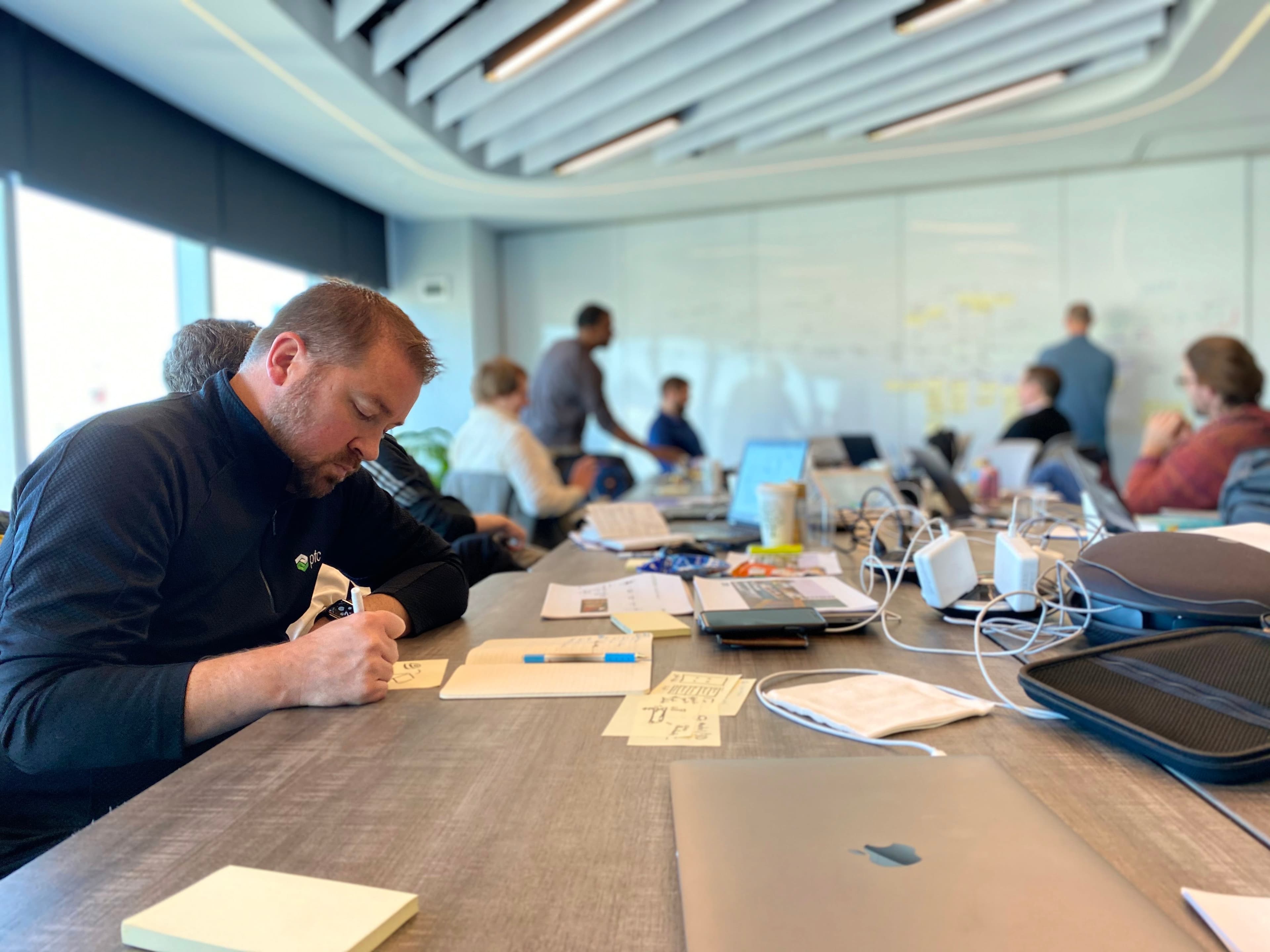
We facilitated multi-day design sprints both internally with stakeholders and subject matter experts, and externally with customers and design partners. Sprints let us move from ambiguity to testable concepts quickly, and get real validation before committing to development. They also built alignment — when a VP of Engineering has sketched alongside you for two days, they understand the tradeoffs in a way no presentation could achieve.
UX flows & architecture
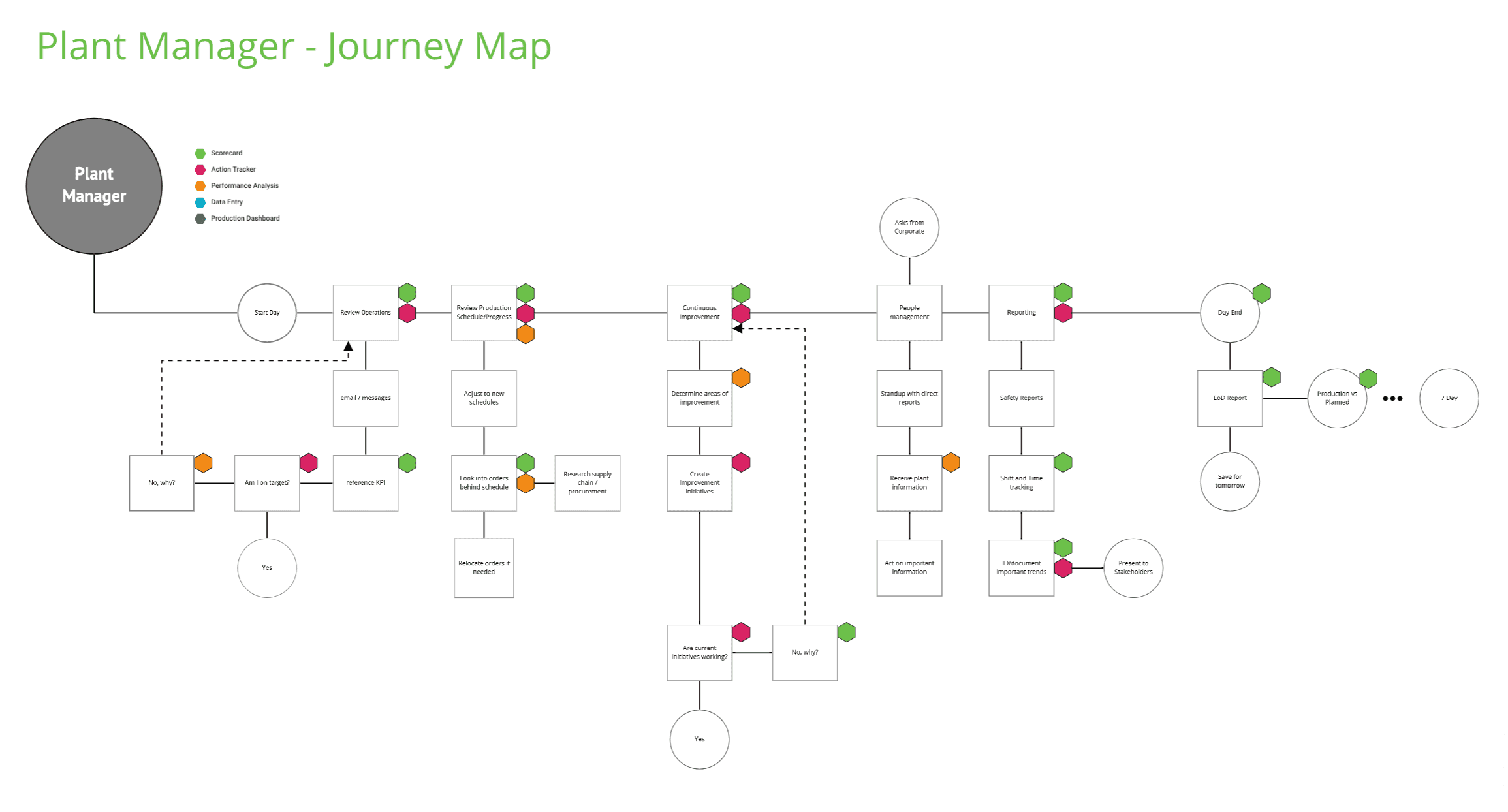
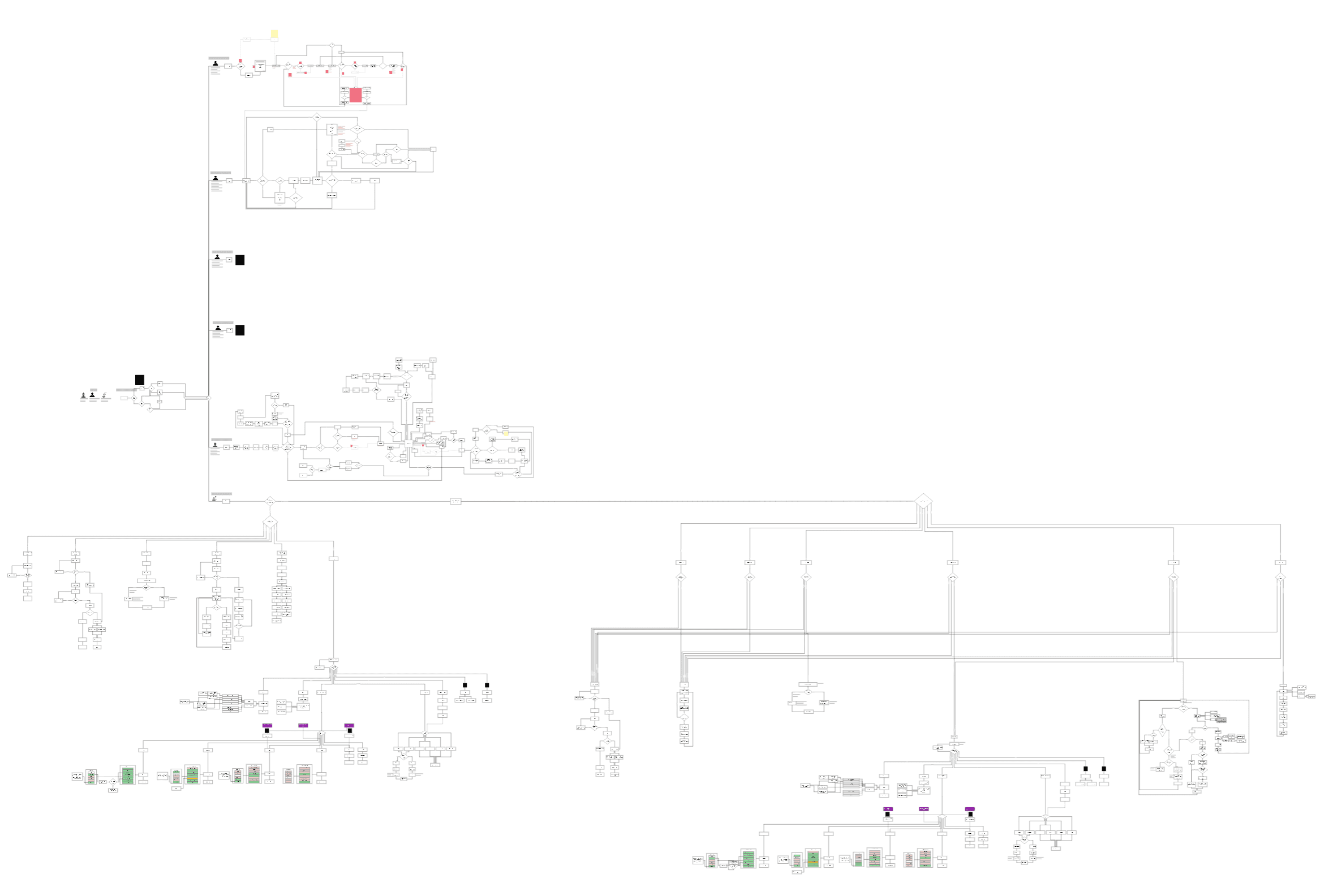
Before any high-fidelity work, we mapped UX flows for every key persona and foundational workflow. These weren't just design artifacts — they became shared documents with engineering, used to architect the data model and surface API requirements early. The investment in flows saved enormous amounts of rework downstream and became the connective tissue between design and development throughout the entire program.
Research & personas
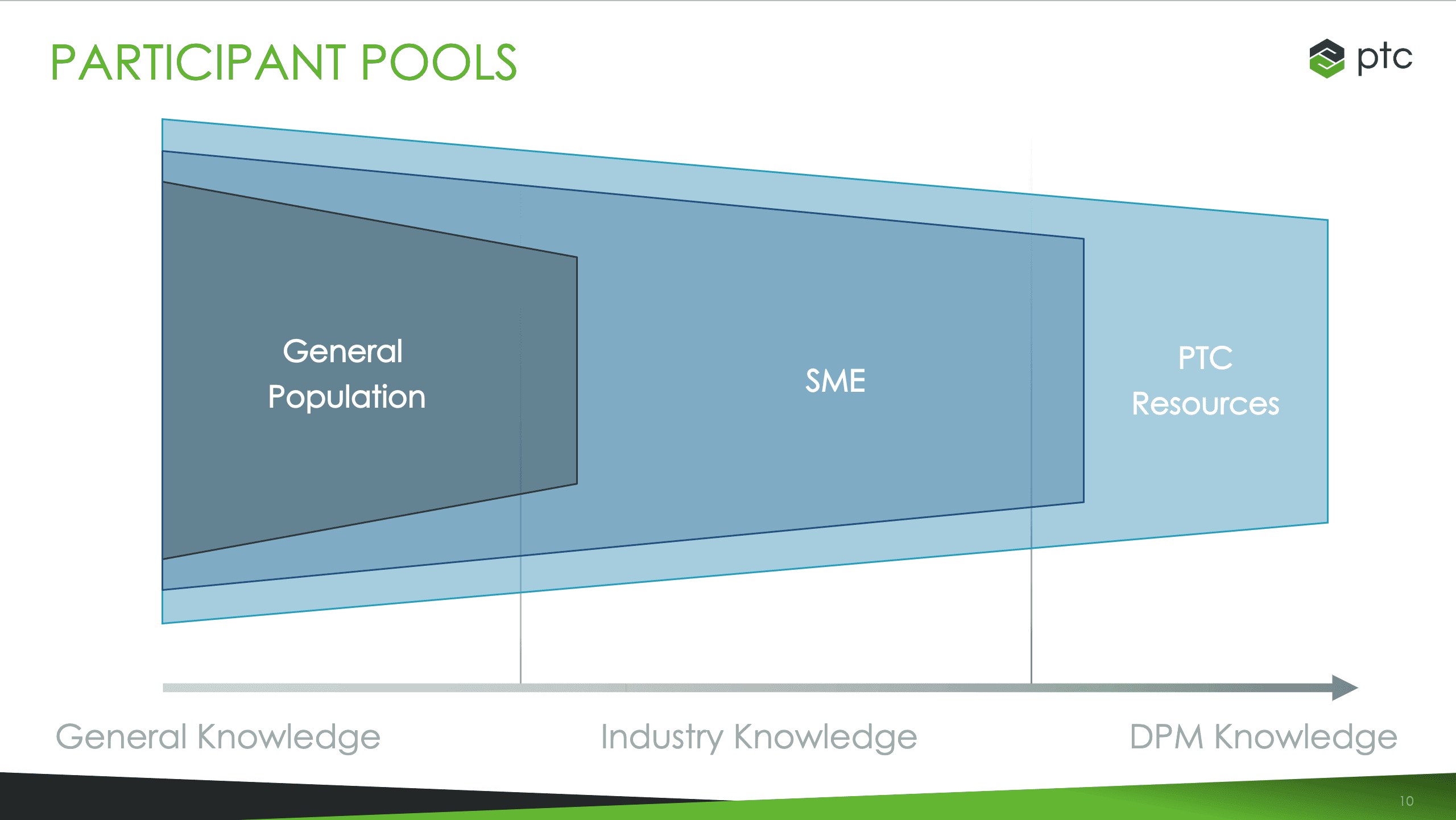
Our research engaged a diverse range of personas — design partners embedded in key customer accounts, outside industry consultants, factory workers at every level, and even members of the general public to pressure-test mental models. The breadth was intentional: a great factory analytics product has to work for the operator who's never used software like this and the data scientist who wants to export everything to Excel.
Three surfaces. One system.
DPM was designed as three deeply interconnected modules — Performance Analysis for understanding what's happening, Configuration for making the system reflect your specific operation, and the underlying data model that tied them together. Each was its own design challenge.
Performance Analysis
From "something went wrong" to "here's exactly why, and here's what to fix first."
Performance Analysis is the analytical heart of DPM — a layered visualization system built around OEE and root cause analysis. The design challenge was giving users multiple lenses on the same data, at whatever level of granularity their role required, without making the interface feel like a BI tool.
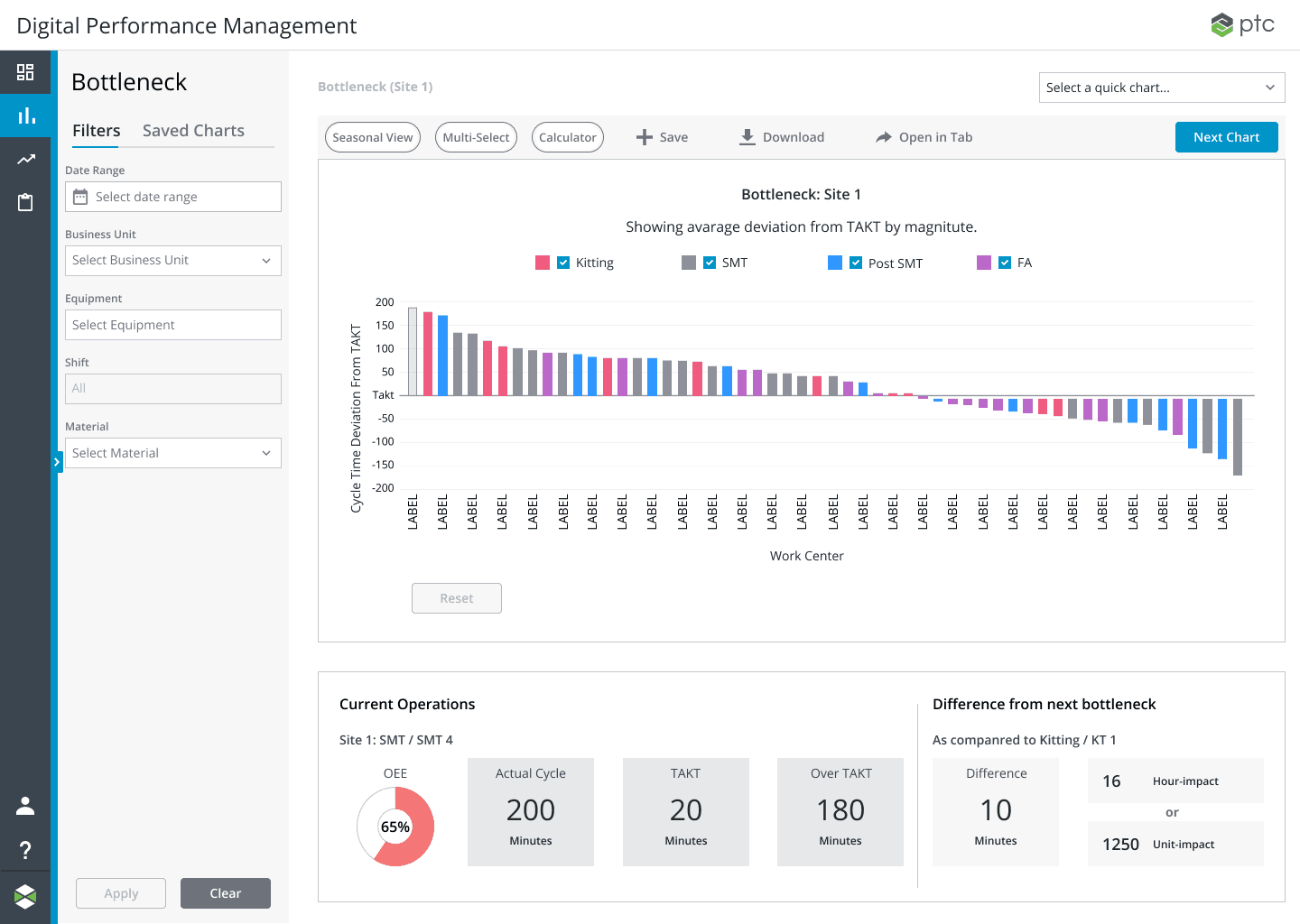
Bottleneck Analysis
Shows time loss across configurable data sets — site, product, material, line — so teams can see where their greatest constraint is right now. The bottleneck changes as you fix things; the system is designed for that continuous improvement loop, not a one-time snapshot.
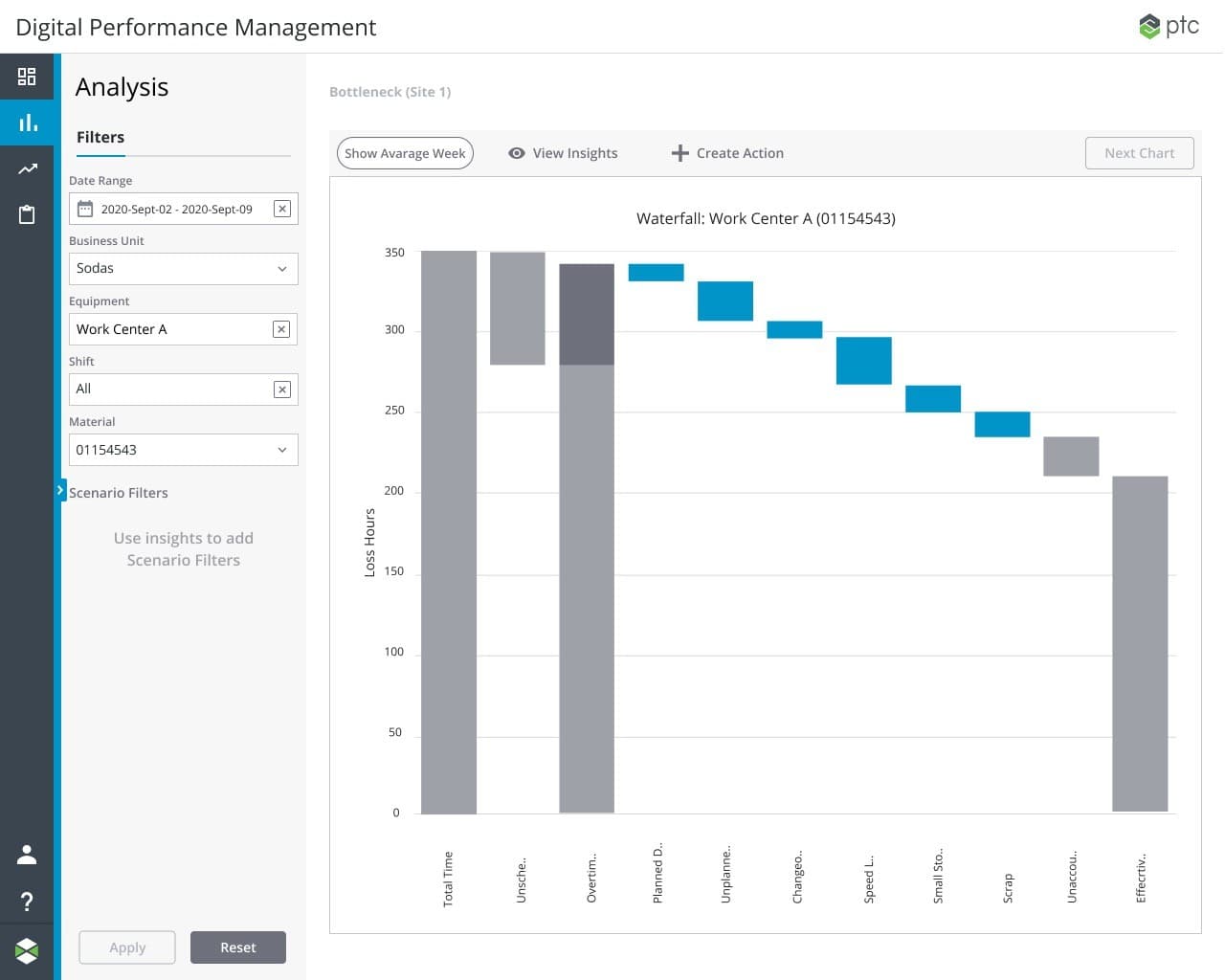
Waterfall Charts
A configurable waterfall visualization breaking down total available time into scheduled downtime, unscheduled downtime, and productive time. Users can slice this by site, area, line, product, or material — the chart adapts to whatever level of the operation they're trying to understand. Seeing where time goes is the first step to recovering it.
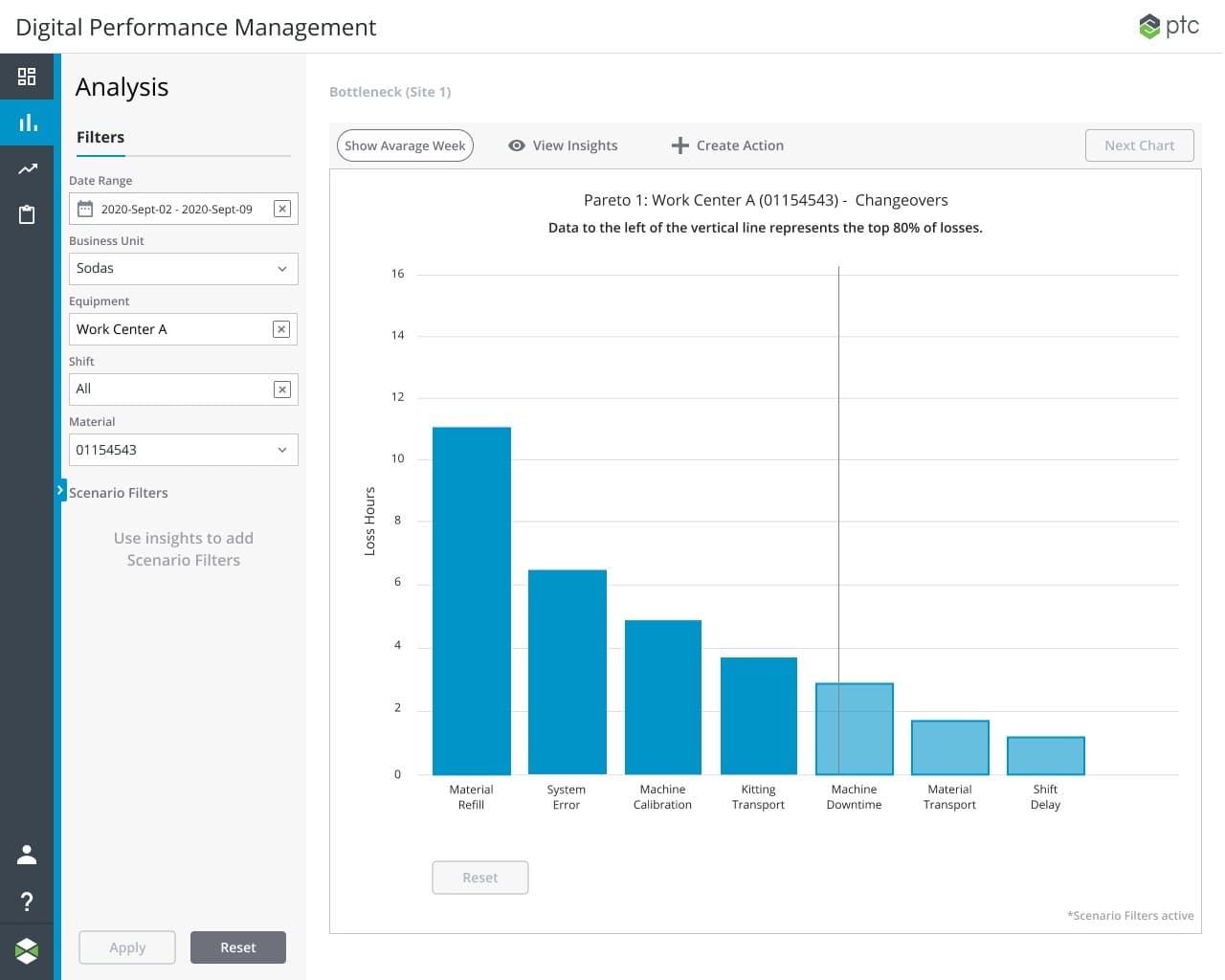
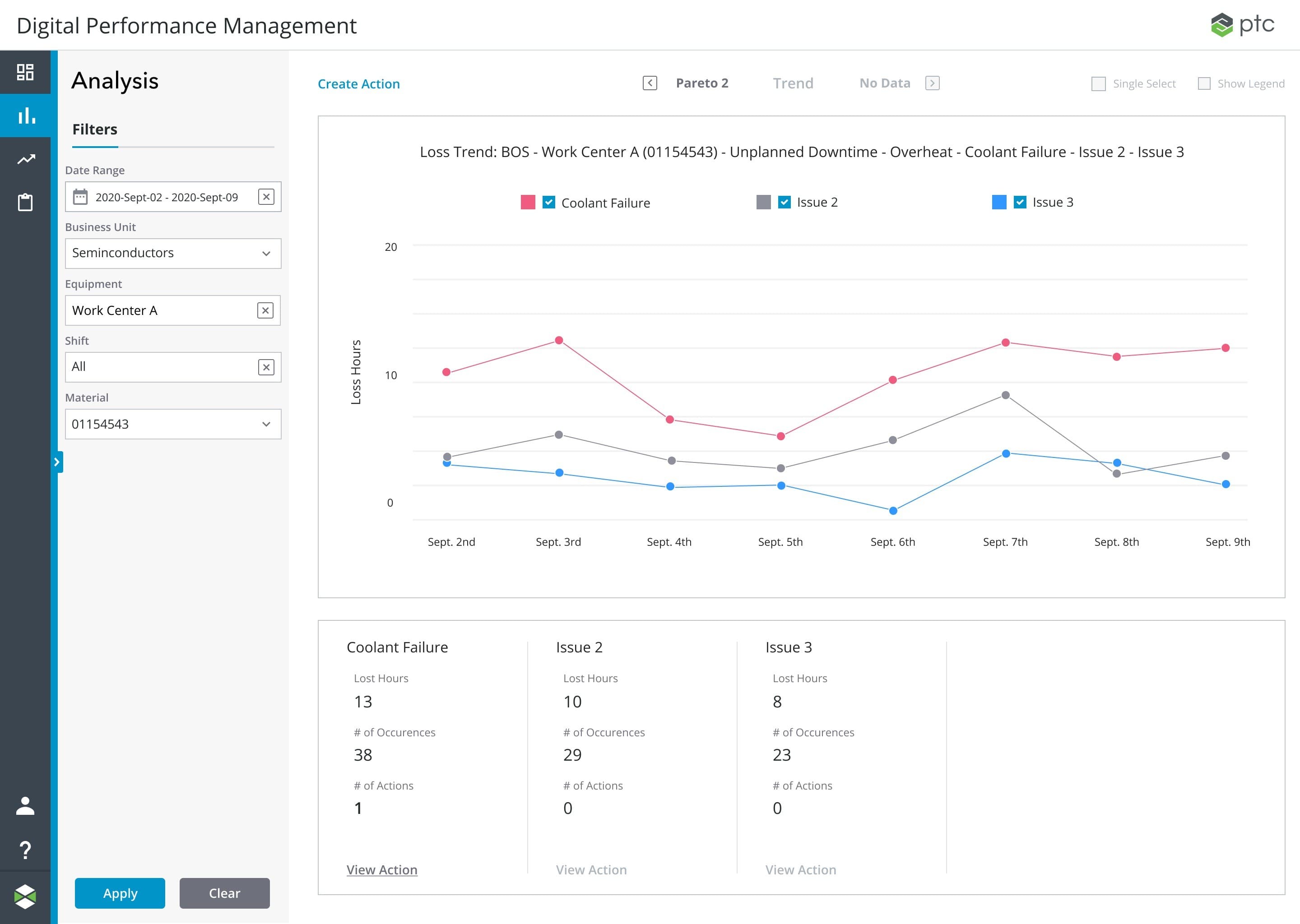
Pareto Charts
Multi-layered Pareto analysis for root cause drill-down. A machine can have multiple levels of reason trees — the UI needed to let users navigate those layers without losing their place or context. The nesting model was one of the harder IA problems in the product: how deep do you go, how do you show where you are, and how do you get back.
Trend Charts
Frequency analysis over time — distinguishing consistent issues from anomalies and correlating patterns with specific events. This was the "so what" layer: not just what's happening, but whether it's getting better, worse, or whether something changed on a specific date that explains everything.
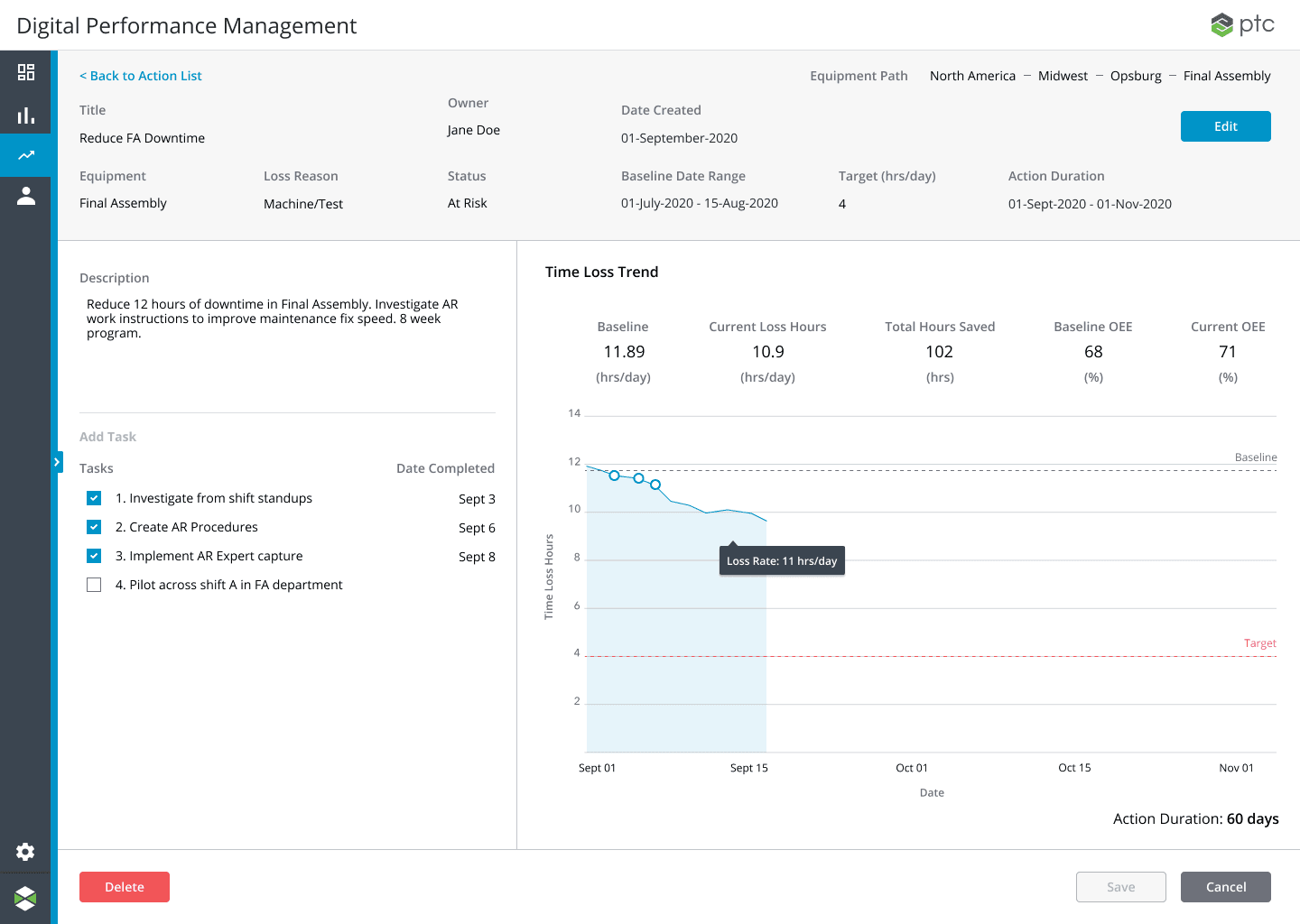
Action Tracker
Analysis without action is just reporting. The Action Tracker closed the loop — connecting root cause findings directly to improvement initiatives, owners, and timelines. It was the difference between DPM being a dashboard and DPM being a system of record for continuous improvement.
Configuration
Enterprise flexibility without enterprise complexity.
Configuration was the most complex surface in DPM by a significant margin — and the one that took the longest to get right. Every factory is different. Products, materials, work centers, reason trees, scheduling rules — all of it needs to be configurable at a granular level for the analytics to mean anything.
The design effort here spanned approximately a year of discovery, validation, and implementation. The core tension was giving administrators the control they needed without creating an interface so complex that only a consultant could set it up. We had to find the right level of abstraction at every layer.
Work Center Configuration
Each work center in a facility has its own material settings, reason trees, and relationships to other work centers in the production line. The configuration model had to accommodate enormous variation while remaining navigable — a factory with 200 work centers needs a different mental model than one with 12.
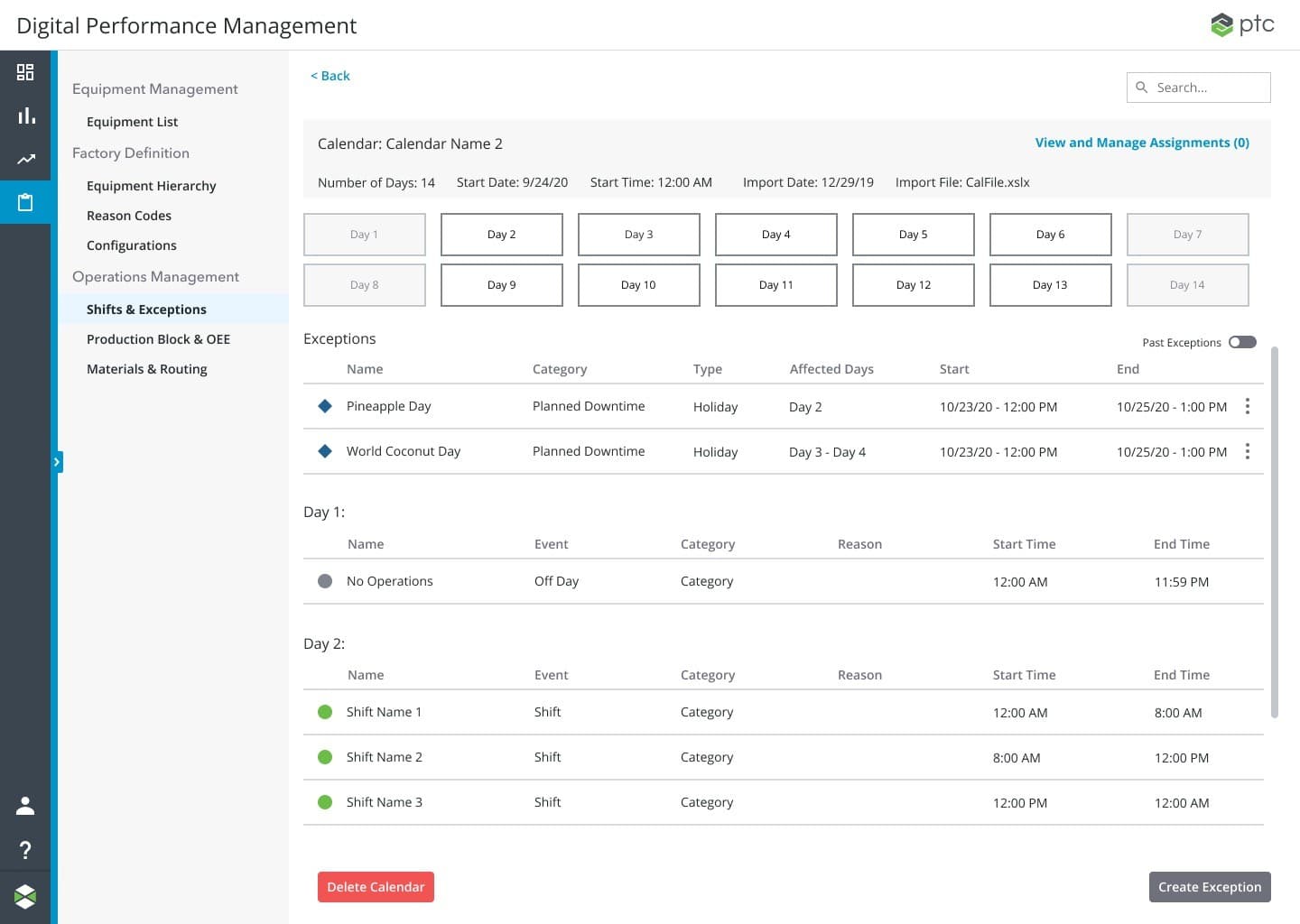
Scheduling
Planned vs. unplanned downtime is foundational to OEE accuracy — you can't measure performance if the system doesn't know when a line is supposed to be running. Scheduling configuration operated at the site and area level, with enough flexibility to handle shift patterns, planned maintenance windows, and holiday schedules across global operations.
What this taught me about designing for the physical world.
DPM was the project that cemented a few things I now treat as fundamental. Research isn't a phase you complete — it's the rhythm of the work. The best design decisions we made came from things we saw on factory floors that no stakeholder briefing would have surfaced.
The player-coach model also shaped how I think about design leadership. Being in the work alongside your team — not just directing — builds a different kind of trust and produces better outcomes. You catch things. You model the behavior you want. You don't lose touch with the craft.
And complexity, properly designed, can feel simple. The hardest problems in this product — the nested Pareto analysis, the configuration model, the OEE data model — none of them needed to feel hard to the person using them. That gap between underlying complexity and experienced simplicity is where I think design creates the most value.